How to Protect Your Credit From Identity Theft in 2026: A 30-Minute Safety Plan
Identity theft can turn a normal week into months of phone calls, disputes, and account cleanup. The good news is that you do not need an expensive monitoring package to take the most important first steps. A few free actions can make it much harder for someone to open new credit in your name.

This guide shows you how to protect your credit in 2026 with a simple plan you can finish in about 30 minutes. It explains credit freezes, fraud alerts, strong account security, credit report checks, and what to do after a data breach. The goal is not to create fear. It is to give you a clear system you can use today.
The Federal Trade Commission says a credit freeze is free, does not affect your credit score, and can help stop someone from opening a new credit account in your name. That makes a freeze one of the strongest tools available to consumers.
Why credit protection matters more than credit monitoring alone
Credit monitoring can be useful. It may tell you when a new account, inquiry, or major change appears on your credit file. But monitoring usually tells you about activity after it happens. Prevention works differently.
A credit freeze places a barrier in front of many new-credit applications. A lender that cannot access your frozen credit file may not be able to approve a new account. A fraud alert is another option. It tells businesses to take extra steps to verify your identity before granting credit.
Think of the tools this way:
- Credit freeze: locks access to your credit file for many new-credit checks.
- Fraud alert: tells lenders to verify your identity before opening new credit.
- Credit monitoring: watches for changes and alerts you.
- Account security: helps prevent someone from taking over accounts you already have.
You do not have to choose only one. A strong plan uses prevention, detection, and account security together.
Step 1: Freeze your credit with all three bureaus

A freeze is useful because a thief may have your name, Social Security number, address, date of birth, or other personal data after a breach. That information can be enough to attempt a new credit application. A freeze makes the approval process harder because your credit file is restricted.
In the United States, you should place a freeze separately with Equifax, Experian, and TransUnion. Freezing only one file is not enough because a lender may check a different bureau.
What a credit freeze does
A credit freeze generally blocks access to your credit report for new credit applications. It does not close your existing accounts. Your credit cards, mortgage, auto loan, and other current accounts can still operate normally. It also does not lower your credit score.
You can temporarily lift or remove a freeze when you want to apply for a loan, card, apartment, or other service that needs a credit check. After the application is complete, you can freeze the file again.
What a credit freeze does not do
A freeze does not stop every type of fraud. A thief may still try to use an existing card, take over an email account, file a fake tax return, or misuse insurance information. This is why your plan should include more than a freeze.
It also does not replace normal account review. Keep checking bank and card statements. Small unauthorized charges can be a test before larger fraud.
Step 2: Decide whether you also need a fraud alert
A fraud alert is different from a freeze. It asks lenders to verify your identity before approving new credit. According to the FTC guidance on freezes and fraud alerts, an initial fraud alert is free and generally lasts one year. You can renew it.
A fraud alert can make sense if you think your information was exposed, your wallet was stolen, or you see signs of identity theft. It can also be used with a freeze.
Freeze or fraud alert: which is better?
If your main goal is to stop unauthorized new credit, a freeze is the stronger default for many people because access to the credit file is restricted. A fraud alert still allows access but adds an identity-verification step.
Use a simple rule:
- If you are not planning to apply for credit soon, consider keeping your files frozen.
- If you suspect fraud, add an alert and review your reports.
- If you apply for credit often, learn how temporary lifts work so the freeze does not become a hassle.
Step 3: Secure the email account tied to your money
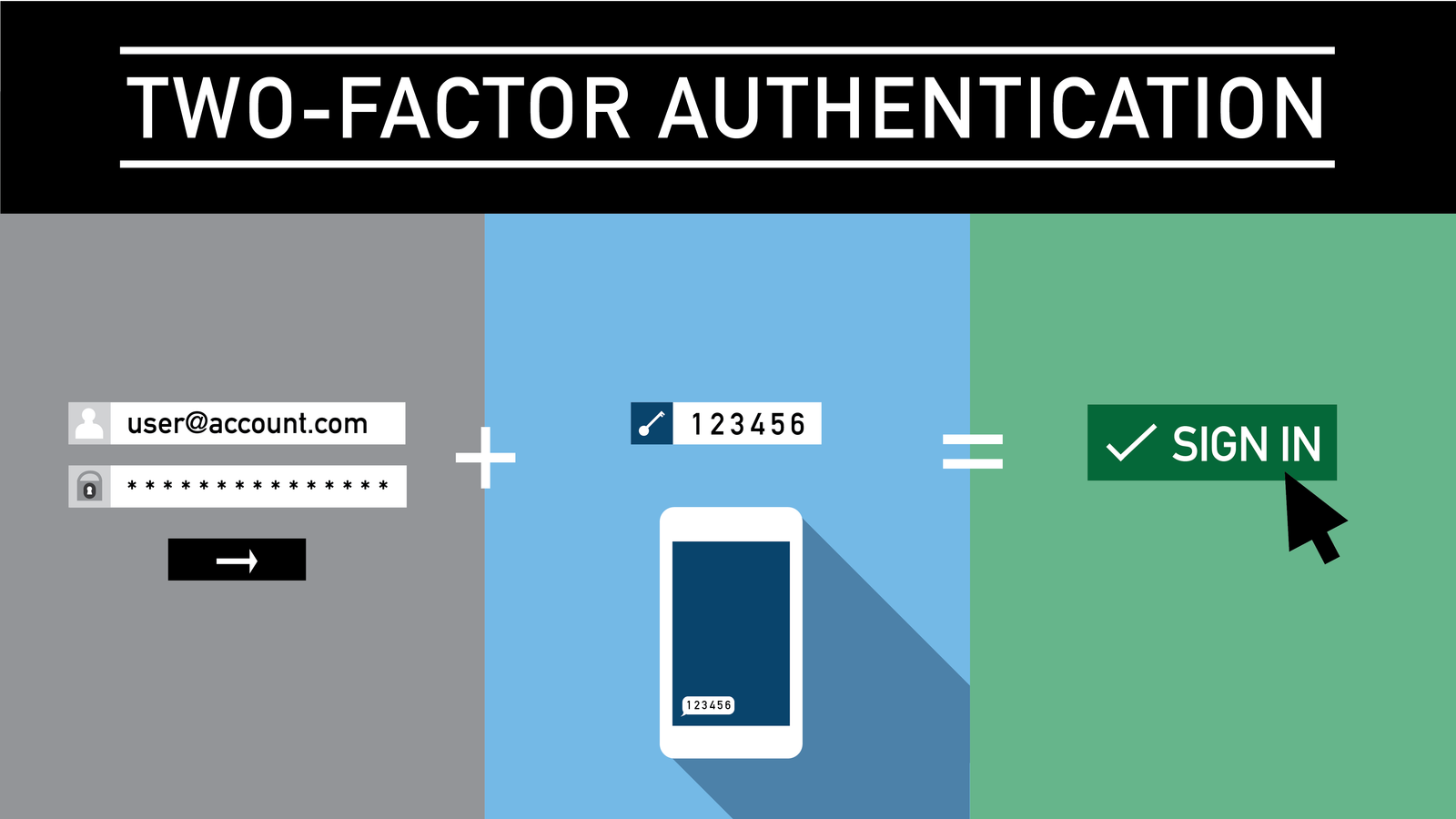
Your email account can be the key to your financial life. Password reset links from banks, brokerages, payment apps, and shopping sites often go to email. If a criminal controls your email, they may be able to reset other passwords.
Start with the email address you use for banking. Give it a unique password that you do not use anywhere else. Turn on multi-factor authentication. An authenticator app or security key can offer stronger protection than a text message when the service supports it.
Use unique passwords, not clever variations
Changing “River2025!” to “River2026!” is easy for you, but it can also be easy for attackers to guess after an old password leaks. A password manager can create and store long, unique passwords for each account.
Your most important accounts should never share the same password. Prioritize email, banking, credit cards, mobile phone service, tax accounts, and cloud storage.
Step 4: Lock down your mobile carrier account
Your phone number is often used for security codes. That makes your carrier account important. A SIM-swap attack happens when someone tries to move your phone number to another SIM or device. If they succeed, they may receive your calls and text messages.
Open your carrier account and look for a port-out PIN, number lock, account PIN, or transfer lock. Names differ by company. Add the strongest option available. Do not use your birthday or a simple four-digit pattern as the PIN.
If your phone suddenly loses service and you did not change carriers or devices, contact your carrier from another phone. Then check your email and financial accounts.
Step 5: Review your credit reports for accounts you do not recognize
Do not wait for a credit-score change. Review the actual accounts and inquiries on your reports. Look for credit cards, loans, addresses, or hard inquiries you do not recognize.
The FTC’s identity theft resources explain how to respond when personal information is misused. If you find an account that is not yours, contact the creditor and the credit bureau. Keep records of dates, names, reference numbers, and documents.
Create a simple review checklist
- Confirm your name and known addresses.
- Review every open credit account.
- Review closed accounts for anything unfamiliar.
- Check hard inquiries.
- Look for collections you do not recognize.
- Save a copy of the report or note the review date.
A monthly review may be useful if you recently had a breach. If your risk is lower, a regular schedule you can maintain is better than an ambitious plan you forget.
Step 6: Turn on transaction alerts
Most banks and card issuers allow alerts for purchases, cash withdrawals, transfers, login attempts, or online transactions. These alerts can help you catch misuse fast.
Set the purchase threshold low enough to catch small test transactions. A thief may not start with a $2,000 purchase. They may try a small charge to see if the card works.
Also turn on alerts for password changes, new payees, new external bank links, and profile changes when your bank offers them.
Step 7: Reduce the personal data you expose
You cannot remove every piece of personal information from the internet. You can reduce easy clues.
Avoid posting your full birth date, home address, phone number, or answers to common security questions. A public social profile can reveal a pet name, school, hometown, anniversary, or family name. Those details can help someone guess weak security questions.
When a website asks for information it does not need, consider whether the field is required. The best data to protect is data you never give away.
What to do after a data breach notice
A breach notice does not always mean someone has used your information. It does mean you should understand what data was exposed.
If only an email address was exposed
Expect more phishing. Do not click urgent links that claim your account will close. Go directly to the company’s app or official site instead.
If a password was exposed
Change it immediately anywhere you reused it. Then stop reusing passwords.
If a Social Security number or similar identity data was exposed
A credit freeze becomes more important because the information may be useful for new-account fraud. Review your credit reports and watch for tax or benefits fraud.
If payment-card data was exposed
Watch the account closely. Ask the issuer whether it recommends a replacement card. Report unauthorized transactions as soon as you see them.
A realistic 30-minute credit safety plan

You do not need to fix everything in one day. Use this simple schedule.
Minutes 0–10: freeze credit
Freeze your files with the three major bureaus. Save the login information in your password manager. Do not store security PINs in an unprotected note.
Minutes 10–18: secure email and phone
Change reused passwords. Turn on multi-factor authentication. Add a port-out or transfer lock to your mobile account.
Minutes 18–25: enable financial alerts
Turn on alerts for card purchases, bank transfers, new payees, and account changes.
Minutes 25–30: schedule a credit review
Add a recurring calendar reminder. The best system is the one you will actually follow.
Real-world example: the data breach email
Imagine Maya receives an email from a retailer saying customer data was exposed. She is not sure whether her Social Security number was included. Instead of buying a costly protection package right away, she starts with free controls.
She goes directly to the retailer’s official site to confirm the notice. She freezes her credit with all three bureaus. She changes a reused password on her email account, turns on an authenticator app, and enables bank alerts. Then she reviews her credit reports.
Two months later, she wants a car loan. She asks the lender which bureau it plans to check, temporarily lifts that freeze, completes the application, and freezes the file again. Her normal credit use continues, but her default state is safer.
Common credit-protection mistakes
Mistake 1: freezing only one bureau
Lenders do not all use the same bureau. Complete the process with all three.
Mistake 2: relying only on a credit-score app
A score can change for many reasons. Review actual accounts and inquiries.
Mistake 3: using the same password for email and banking
This creates a chain reaction after one password leak. Use unique passwords.
Mistake 4: clicking breach-notice links without checking them
Scammers often use real news as bait. Open the company’s official app or type its known address yourself.
Mistake 5: paying a company to place a freeze
You can place and lift a credit freeze for free. Be cautious with services that charge for actions you can perform directly.
What to do if identity theft already happened
If you find an account you did not open, move from prevention to recovery. Report the issue to the affected company. Freeze your credit. Change passwords on related accounts. Review your reports for other fraud.
The FTC directs identity-theft victims to IdentityTheft.gov for a recovery plan. Follow the steps that match the type of fraud you experienced. Save copies of letters, reports, screenshots, and confirmation numbers.
If money was taken from a bank or card account, contact the financial institution quickly. Consumer protections can depend on the type of account and how fast you report the problem.
Quick answers
Does a credit freeze hurt my credit score?
No. A freeze does not lower your score.
Can I still use my credit cards after a freeze?
Yes. Existing accounts normally continue to work.
Can I apply for a mortgage with frozen credit?
Yes, but you will usually need to lift or temporarily thaw the relevant credit files during the application.
Is paid identity monitoring necessary?
It can add convenience, especially after a breach, but it does not replace a freeze, strong account security, and regular review. Start with the free controls first.
Conclusion: make protection your default setting
Strong credit protection is not about checking your score every day. It is about making fraud harder and making unusual activity easier to spot.
Start with a free credit freeze. Secure your email and phone account. Use unique passwords and multi-factor authentication. Turn on bank and card alerts. Review your credit reports on a schedule. If a breach happens, respond based on the information that was exposed instead of reacting to fear.
Thirty focused minutes can create a protection system that keeps working long after you close this page.
This article is for general educational purposes and does not provide legal, financial, or credit-repair advice.